
Learn how to create and use concept maps for learning. Discover the benefits of concept mapping, step-by-step creation methods, practical examples, and tips to improve understanding, memory, and academic performance.
Learning can sometimes feel overwhelming, especially when dealing with large amounts of information. Whether you are a school student, college learner, or professional preparing for exams or certifications, organizing information effectively is essential. One of the most powerful learning tools available today is the Concept Map.
Concept maps help learners visualize relationships between ideas, making complex topics easier to understand, remember, and apply. They transform scattered information into a structured format that promotes deeper learning and critical thinking.
In this guide, we will explore what concept maps are, their benefits, how to create them, and the best ways to use them for effective learning.
What Is a Concept Map?
A concept map is a visual representation of information where ideas, concepts, and topics are connected using lines, arrows, and linking words.
The main idea is usually placed at the center or top of the map, while related concepts branch out into smaller categories and subtopics.
Concept maps help learners understand how different pieces of information relate to one another rather than memorizing isolated facts.
Example
For the topic “Photosynthesis”:
- Photosynthesis
- Requires Sunlight
- Requires Water
- Requires Carbon Dioxide
- Produces Oxygen
- Produces Glucose
This visual structure helps students quickly understand the complete process and relationships between concepts.
Why Concept Maps Are Effective for Learning
Concept mapping is based on active learning principles. Instead of passively reading notes, students organize information themselves, which improves comprehension and retention.
Improves Understanding
Concept maps help learners see the “big picture” and understand how different concepts connect.
Enhances Memory
Visual learning aids improve recall by organizing information in a meaningful structure.
Encourages Critical Thinking
Students analyze relationships between ideas instead of simply memorizing definitions.
Simplifies Complex Topics
Large subjects become easier to understand when broken into smaller connected concepts.
Supports Long-Term Retention
Research suggests that meaningful learning techniques improve long-term knowledge retention compared to rote memorization.
Key Components of a Concept Map
Understanding the basic elements of a concept map is essential before creating one.
Main Concept
The central topic being studied.
Related Concepts
Supporting ideas connected to the main topic.
Linking Words
Words or phrases that explain relationships between concepts.
Examples:
- Causes
- Leads to
- Includes
- Results in
- Requires
Connecting Lines
Lines or arrows that visually connect concepts.
Hierarchical Structure
Information is organized from general concepts to specific details.
Benefits of Using Concept Maps
Better Knowledge Organization
Concept maps organize information logically and visually.
Increased Learning Efficiency
Students can review entire topics quickly through one visual diagram.
Improved Problem-Solving Skills
Understanding connections between concepts enhances analytical thinking.
Stronger Exam Preparation
Concept maps help students revise large topics effectively before exams.
Better Collaboration
Group projects become easier when team members visually organize ideas together.
Increased Creativity
Creating connections between concepts encourages innovative thinking and brainstorming.
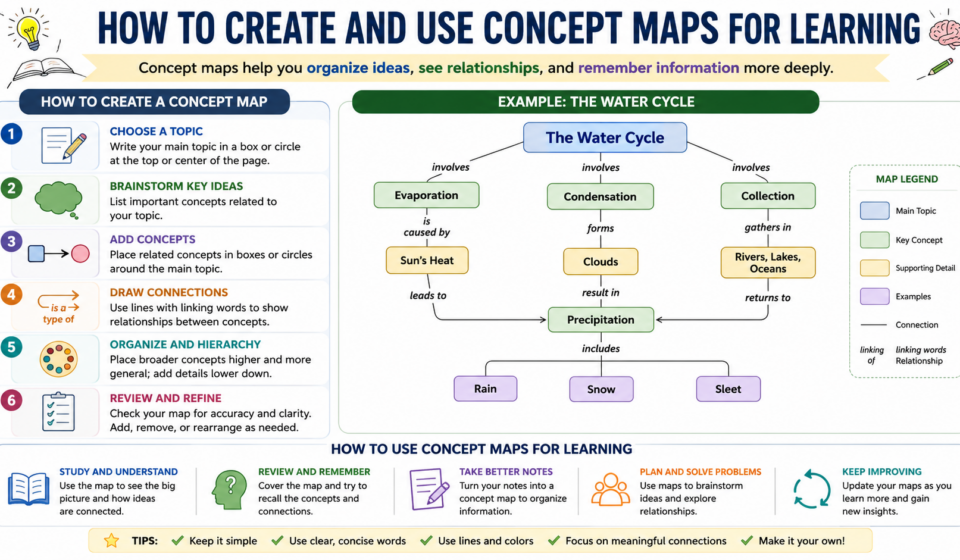
Step-by-Step Guide to Creating a Concept Map
Step 1: Choose a Main Topic
Start by identifying the primary concept you want to learn.
Examples:
- Human Digestive System
- Climate Change
- Digital Marketing
- Machine Learning
Write this topic in the center or at the top of your page.
Step 2: Brainstorm Related Concepts
List all important ideas associated with the main topic.
For example, under Digital Marketing:
- SEO
- Social Media Marketing
- Content Marketing
- Email Marketing
- PPC Advertising
Step 3: Organize Concepts Hierarchically
Arrange concepts from broad to specific.
Example:
Digital Marketing
- SEO
- Keywords
- Backlinks
- On-Page SEO
- Social Media Marketing
Step 4: Draw Connections
Use lines or arrows to connect related concepts.
This helps visualize relationships between ideas.
Step 5: Add Linking Words
Use descriptive words to explain the relationship.
Examples:
- SEO “improves” website visibility
- Keywords “support” SEO
- Content Marketing “drives” audience engagement
Step 6: Review and Refine
Check whether the map accurately represents the topic and remove unnecessary information.
Best Tools for Creating Concept Maps
Several digital tools make concept mapping easy.
MindMeister
A popular cloud-based mind mapping platform.
Lucidchart
Ideal for creating professional concept maps and diagrams.
Canva
Offers user-friendly concept map templates.
Miro
Excellent for collaborative brainstorming and visual learning.
Microsoft PowerPoint
Useful for creating simple concept maps manually.
Google Drawings
A free option for students and educators.
How Students Can Use Concept Maps
Exam Preparation
Create concept maps summarizing entire chapters before exams.
Note-Taking
Replace lengthy notes with visual concept structures.
Essay Planning
Organize arguments and supporting points visually before writing.
Project Development
Map project ideas, goals, and tasks.
Research Activities
Visualize relationships between theories, findings, and concepts.
How Teachers Can Use Concept Maps
Lesson Planning
Organize lesson content visually.
Classroom Discussions
Help students understand topic relationships.
Assessment Activities
Evaluate student understanding through concept map assignments.
Group Learning
Encourage collaboration through shared concept mapping exercises.
Concept Maps vs Mind Maps
Many learners confuse concept maps with mind maps.
| Feature | Concept Map | Mind Map |
|---|---|---|
| Structure | Hierarchical | Radial |
| Connections | Multiple relationships | Single branches |
| Purpose | Deep understanding | Brainstorming |
| Complexity | Higher | Simpler |
| Learning Focus | Concept relationships | Idea generation |
Both tools are useful, but concept maps are generally better for academic learning and complex subjects.
Common Mistakes to Avoid
Adding Too Much Information
Keep concepts concise and relevant.
Ignoring Relationships
The purpose of a concept map is to show connections between ideas.
Poor Organization
Arrange concepts logically from general to specific.
Overcomplicating Design
Focus on clarity rather than decoration.
Using Vague Linking Words
Use clear relationship descriptions whenever possible.
Tips for Creating Effective Concept Maps
Start Simple
Begin with major concepts before adding details.
Use Colors
Different colors help distinguish categories.
Include Keywords
Avoid long sentences.
Revise Regularly
Update concept maps as your understanding grows.
Use Digital Tools
Digital platforms make editing and collaboration easier.
Practice Frequently
The more concept maps you create, the more effective they become.
Real-Life Example of Concept Mapping
Consider a student learning about Climate Change.
Main Concept:
Climate Change
Related Concepts:
- Greenhouse Gases
- Fossil Fuels
- Global Warming
- Renewable Energy
- Environmental Impact
Connections:
- Fossil Fuels produce Greenhouse Gases
- Greenhouse Gases cause Global Warming
- Global Warming contributes to Climate Change
- Renewable Energy helps reduce Greenhouse Gas emissions
This visual approach helps students understand the entire system rather than isolated facts.
The Future of Concept Mapping in Education
As education becomes increasingly digital, concept mapping continues to gain popularity.
Modern learning platforms now integrate visual learning tools, AI-powered diagram creation, and collaborative concept mapping features. These technologies help students build stronger understanding and improve learning outcomes.
With the rise of online education, concept maps are becoming an essential tool for organizing information, improving retention, and supporting active learning.
Sources
https://cmap.ihmc.us
https://www.miro.com
Conclusion
Concept maps are powerful visual learning tools that help students organize information, understand relationships between ideas, and improve long-term memory retention. By transforming complex topics into structured visual representations, concept maps make learning more engaging and effective.
Whether you are preparing for exams, conducting research, planning projects, or teaching others, concept maps can significantly improve understanding and knowledge organization. With regular practice and the right tools, concept mapping can become one of the most valuable techniques in your learning journey.
Frequently Asked Questions (FAQs)
What is a concept map used for?
A concept map is used to visually organize information and show relationships between concepts, helping learners understand and remember topics more effectively.
How do concept maps improve learning?
Concept maps promote active learning, improve comprehension, enhance memory retention, and help learners see connections between ideas.
What is the difference between a concept map and a mind map?
A concept map focuses on relationships between concepts using linking words, while a mind map primarily organizes ideas around a central theme for brainstorming.
Can concept maps be used for exam preparation?
Yes, concept maps are highly effective for exam revision because they summarize large amounts of information into a visual format.
Which software is best for creating concept maps?
Popular tools include MindMeister, Lucidchart, Canva, Miro, Microsoft PowerPoint, and Google Drawings.