LinkedIn Tips for Students 2026: Complete Guide to Building a Powerful Profile and Landing Career Opportunities

A well-optimized LinkedIn profile can help students showcase their skills, academic achievements, projects, certifications, and career aspirations while creating valuable professional connections.
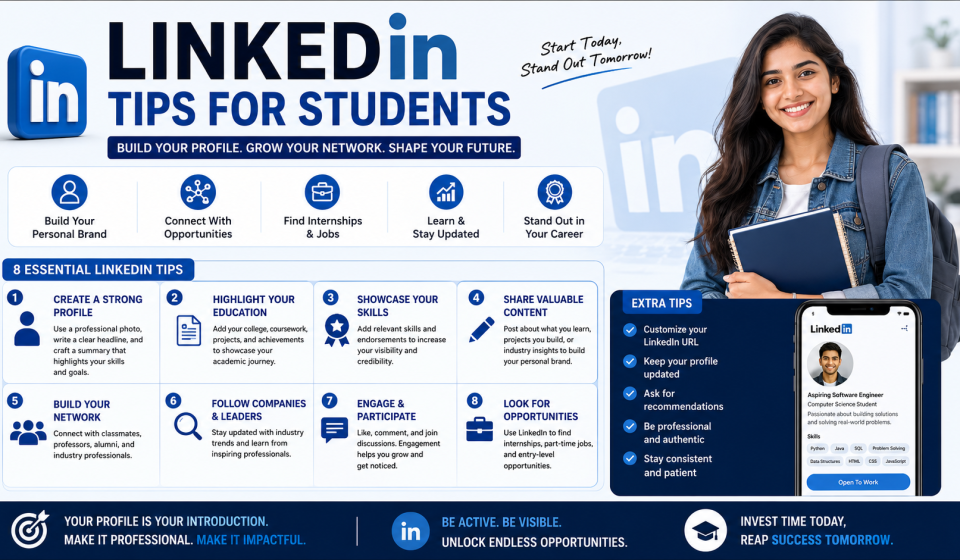
LinkedIn has become one of the most important professional networking platforms for students looking to build successful careers. In today’s competitive job market, having a strong LinkedIn profile is no longer optional—it is a necessity. Recruiters, hiring managers, internship coordinators, and industry professionals actively use LinkedIn to discover talented students and fresh graduates.For students, LinkedIn serves as more than just an online resume. It is a platform for networking, learning, personal branding, and career development. Whether you are seeking internships, campus placements, freelance opportunities, mentorship, or full-time employment, LinkedIn can significantly improve your visibility among recruiters. By understanding how to create a professional profile, engage with industry content, and build meaningful connections, students can gain a competitive advantage and unlock numerous career opportunities.
Why LinkedIn Is Important for Students
LinkedIn connects students with professionals, recruiters, alumni, educators, and employers from around the world.
Benefits of LinkedIn for students include:
- Professional networking
- Internship opportunities
- Job opportunities
- Personal branding
- Industry insights
- Career guidance
- Skill development
- Access to recruiters
- Learning resources
- Alumni connections
Students who actively use LinkedIn often gain better exposure to career opportunities compared to those who rely solely on traditional job portals.
Create a Professional LinkedIn Profile
Your LinkedIn profile is your digital professional identity.
Use a Professional Profile Photo
A professional profile picture creates a positive first impression.
Tips for profile photos:
- Wear professional attire
- Use a clear image
- Maintain good lighting
- Smile naturally
- Avoid distracting backgrounds
Profiles with professional photos generally receive more profile views and connection requests.
Write a Strong LinkedIn Headline
The headline appears directly below your name and is one of the first things people notice.
Example Headlines
- Computer Science Student | Aspiring Software Developer
- Mechanical Engineering Student | CAD Design Enthusiast
- Business Administration Student | Marketing and Analytics Learner
A strong headline clearly communicates your background and career interests.
Craft an Impressive About Section
The About section allows students to introduce themselves professionally.
What to Include
- Educational background
- Career interests
- Skills
- Academic achievements
- Career goals
- Passion areas
A well-written summary helps recruiters understand your profile quickly.
Complete Every Profile Section
Incomplete profiles often receive less attention from recruiters.
Important sections include:
- Profile photo
- Headline
- About
- Education
- Experience
- Skills
- Certifications
- Projects
- Achievements
- Volunteer work
A complete profile appears more credible and professional.
Highlight Your Education
As a student, education is one of the most important profile sections.
Include Details Such As
- Degree name
- Institution
- Academic achievements
- Relevant coursework
- Activities and societies
Educational information helps recruiters understand your academic background.
Add Relevant Skills
Skills improve profile visibility in recruiter searches.
Popular Student Skills
- Communication
- Leadership
- Teamwork
- Problem-solving
- Programming
- Data Analysis
- Project Management
- Public Speaking
Choose skills that genuinely reflect your abilities.
Showcase Academic Projects
Projects demonstrate practical application of classroom learning.
Examples
- Software development projects
- Engineering projects
- Research projects
- Marketing campaigns
- Business case studies
Projects provide evidence of technical and analytical capabilities.
Add Internships and Work Experience
Even short internships can significantly strengthen your profile.
Benefits
- Demonstrates practical experience
- Shows industry exposure
- Builds credibility
- Improves employability
Include responsibilities, achievements, and measurable outcomes whenever possible.
Earn and Display Certifications
Certifications validate skills and knowledge.
Popular certification categories include:
- Data Science
- Artificial Intelligence
- Cloud Computing
- Cyber Security
- Digital Marketing
- Programming Languages
- Project Management
Adding certifications makes profiles more attractive to recruiters.
Build a Strong Professional Network
Networking is one of LinkedIn’s greatest strengths.
Connect With
- Classmates
- Professors
- Alumni
- Industry professionals
- Recruiters
- Internship coordinators
Building meaningful relationships can create future career opportunities.
Personalize Connection Requests
Avoid sending generic connection requests.
Good Practice
Include a short message explaining:
- Who you are
- Why you want to connect
- Shared interests or goals
Personalized requests often receive better response rates.
Follow Industry Leaders
Following experts helps students stay informed about industry developments.
Benefits
- Learn from professionals
- Understand market trends
- Discover opportunities
- Gain career insights
Industry knowledge can improve interview performance and career planning.
Engage With Content Regularly
Active engagement increases profile visibility.
Ways to Engage
- Like posts
- Comment thoughtfully
- Share articles
- Participate in discussions
Meaningful engagement helps build a professional presence.
Create and Share Valuable Content
Students can establish credibility by sharing useful content.
Content Ideas
- Internship experiences
- Project updates
- Learning achievements
- Industry insights
- Event participation
- Certification completion
Consistent posting demonstrates enthusiasm and commitment to learning.
Optimize Keywords in Your Profile
LinkedIn’s search system relies heavily on keywords.
Include Relevant Keywords
For example:
- Software Development
- Data Science
- Mechanical Engineering
- Marketing Analytics
- Financial Analysis
Using industry-specific keywords improves discoverability.
Request Recommendations
Recommendations strengthen profile credibility.
Potential Sources
- Professors
- Internship supervisors
- Project mentors
- Team leaders
Positive recommendations provide social proof of your capabilities.
Obtain Skill Endorsements
Skill endorsements validate your expertise.
How to Get Endorsements
- Connect with classmates
- Collaborate on projects
- Participate in internships
- Engage with professional contacts
Endorsements help recruiters assess your strengths.
Join LinkedIn Groups
LinkedIn groups connect students with communities focused on specific industries and interests.
Benefits
- Networking opportunities
- Career discussions
- Industry updates
- Learning resources
Active participation can expand professional connections.
Use LinkedIn Learning
LinkedIn Learning offers thousands of professional courses.
Popular Learning Areas
- Technology
- Business
- Marketing
- Leadership
- Data Analysis
Completing courses demonstrates commitment to professional development.
Follow Company Pages
Students should follow organizations they admire or hope to join.
Benefits
- Job updates
- Internship announcements
- Company culture insights
- Recruitment information
Following companies helps students stay informed about opportunities.
Search for Internship Opportunities
LinkedIn is a powerful platform for internship discovery.
Internship Search Tips
- Use relevant keywords
- Set job alerts
- Apply early
- Customize applications
Internships often serve as stepping stones toward full-time employment.
Build a Personal Brand
Personal branding involves creating a professional image that reflects your expertise and values.
Elements of Personal Branding
- Consistent profile presentation
- Valuable content sharing
- Professional communication
- Active networking
A strong personal brand attracts opportunities naturally.
Common LinkedIn Mistakes Students Should Avoid
Incomplete Profiles
Missing sections reduce visibility and credibility.
Unprofessional Photos
Casual photos can negatively impact professional perception.
Weak Headlines
Generic headlines fail to communicate value.
Inactivity
Inactive profiles receive limited visibility.
Spamming Connections
Networking should focus on quality relationships rather than quantity.
LinkedIn Strategy for First-Year Students
Focus On
- Building a profile
- Networking with peers
- Exploring industries
- Learning new skills
LinkedIn Strategy for Final-Year Students
Prioritize
- Internship experience
- Resume optimization
- Recruiter engagement
- Job applications
- Interview preparation
Future of LinkedIn for Career Growth
As recruitment increasingly moves online, LinkedIn’s importance will continue growing. Artificial intelligence, digital recruitment tools, professional networking, remote work opportunities, and global hiring trends make LinkedIn one of the most valuable platforms for students. Those who invest time in building strong profiles and professional networks today are likely to gain significant career advantages in the future.
Source Links
https://www.linkedin.com
https://learning.linkedin.com
https://www.indeed.com
https://www.glassdoor.com
https://www.naukri.com
Conclusion
LinkedIn has become an essential career development platform for students seeking internships, placements, networking opportunities, and professional growth. A well-crafted profile, strong network, relevant certifications, meaningful engagement, and strategic personal branding can significantly improve visibility among recruiters and industry professionals. By actively leveraging LinkedIn’s features and maintaining a professional online presence, students can position themselves for long-term career success in an increasingly competitive job market.
FAQ
1.Why should students use LinkedIn?
LinkedIn helps students build professional networks, find internships, discover job opportunities, and develop their personal brand.
2.Is LinkedIn useful for first-year students?
Yes, first-year students can begin networking, exploring industries, and building their professional presence early.
3.What should students include in their LinkedIn profiles?
Students should include education, skills, projects, internships, certifications, achievements, and career goals.
4.How many LinkedIn connections should a student have?
Quality is more important than quantity. Students should focus on building meaningful professional relationships.
5.Can recruiters contact students through LinkedIn?
Yes, recruiters frequently use LinkedIn to identify and contact potential candidates.
6.How often should students post on LinkedIn?
Posting valuable content one to three times per week is generally effective.
7.Are LinkedIn certifications valuable?
Certifications can strengthen profiles by demonstrating skills and commitment to learning.
8.Can LinkedIn help students get internships?
Yes, many companies advertise internships on LinkedIn, and recruiters actively search for student candidates.